● Smart Productivity Automation – Natural Activity Simulation for Your PC

Stay Productive from Anywhere with SmartWork

SmartWork helps you simulate natural computer activity with smooth mouse movements, clicks and scrolling patterns. Keep your session active, automate repetitive presence tasks, and maintain workflow continuity while focusing on what really matters.

1K+
Active Users
99%
Stability
4.8
User Rating
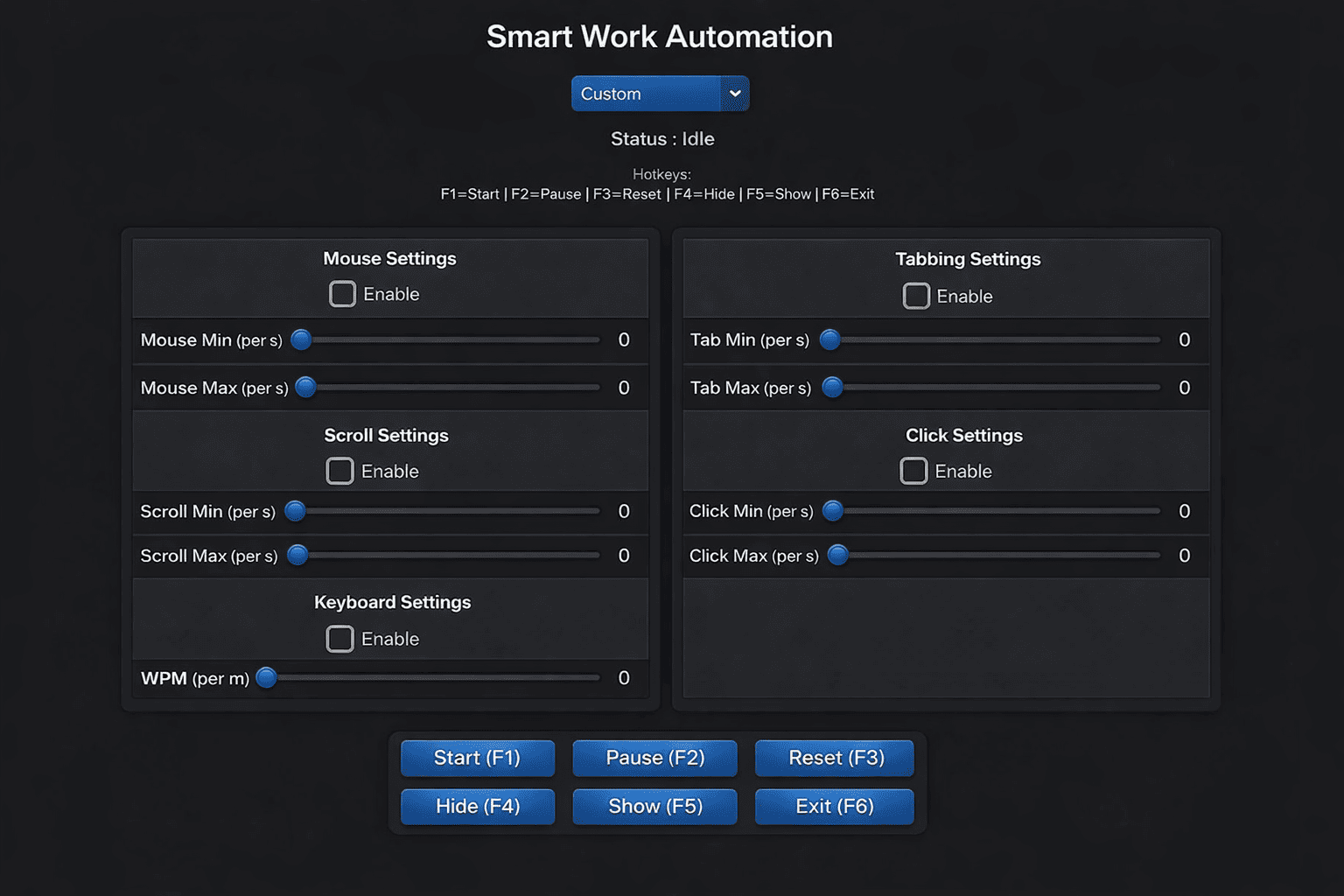
SmartWork automation interface preview
SmartWork – Intelligent activity simulation for smooth workflow automation

Powerful Human Activity Simulation Made Simple

SmartWork Automa simulates real human activity on your computer with natural mouse movement, clicks and scrolling to keep your system active and productive.


Automatic Mouse & Keyboard Activity

Simulates natural mouse movement, typing, scrolling and tab switching to create realistic human activity on your PC.

Stay Active & Productive

Keep your computer active while focusing on important tasks with continuous and realistic activity simulation.

No Setup Required

Start instantly without accounts or configuration. Launch SmartWork and simulate activity in seconds.

Works Across All Applications

Compatible with all desktop environments, simulating human activity smoothly across any software or workflow.

Real Human-Like Behavior

Advanced algorithms generate natural mouse paths, pauses and interactions that mimic real user behavior.

Fast & Lightweight

Runs instantly with minimal resources, providing smooth and continuous activity simulation without slowing your system.

How SmartWork Simulates Real Human Activity

SmartWork Automa uses advanced algorithms to simulate natural human activity on your computer, helping you stay active, productive and focused without manual effort.

1. Intelligent Activity Simulation

SmartWork generates natural mouse movements, clicks and scrolling patterns that look like real human interaction.

2. Continuous Activity

Keeps your computer active with realistic timing, pauses and behavior to avoid inactivity detection.

3. Focus on What Matters

Work on important tasks while SmartWork handles background activity automatically and smoothly.

4. Flexible & Adaptive Behavior

Adjust activity patterns, speed and interactions to match real user behavior and your workflow.

See SmartWork in Action

Watch how SmartWork Automa simulates real human activity with natural mouse movement, clicks and scrolling to keep your computer active.

Simple & Transparent Pricing

Choose the plan that fits your needs. Start instantly and simulate real human activity with no setup required.


6 Months License
$99/6 mo

Best choice for consistent productivity. SmartWork simulates natural human activity to keep your system active every day.

  • Full SmartWork tool access
  • Advanced human-like behavior
  • Continuous activity simulation
  • Optimized for daily use
Get Best Value β†’

Built by Automation & AI Experts

SmartWork is developed by specialists in human behavior simulation, automation systems, and productivity engineering.


Alex Morgan
Alex Morgan
Automation Engineer

Specialist in building human-like interaction systems and activity simulation algorithms.

Daniel Carter
Daniel Carter
Productivity Systems Designer

Focuses on workflow optimization and intelligent activity automation for remote systems.

Mia Johnson
J. Harris
Human Behavior Simulation Expert

Develops realistic human-like mouse movement and interaction patterns for SmartWork.

Ethan Brooks
Ethan Brooks
AI & Automation Architect

Designs adaptive AI systems that make SmartWork behave like a real user.

What our users say

β˜…β˜…β˜…β˜…β˜…

"SmartWork helps me maintain a natural activity pattern while I focus on deep work. It runs quietly in the background and keeps my workflow consistent without distractions."

Alex Thompson
Alex Thompson
Remote Developer, 4 months
β˜…β˜…β˜…β˜…β˜…

"As a freelancer, SmartWork helps me maintain consistent system activity while I step away from my desk. It makes my workflow feel smoother and more balanced."

Maria Garcia
Maria Garcia
Freelance Designer, 1 year
β˜…β˜…β˜…β˜…β˜…

"SmartWork runs in the background and simulates natural user activity patterns. It helps me stay productive while managing multiple projects efficiently."

David Kim
David Kim
Project Manager, 8 months

Frequently Asked Questions

Everything you need to know about SmartWork before getting started.

What is SmartWork?

SmartWork is a desktop automation and productivity simulation tool designed for remote professionals. It simulates natural human computer activity such as mouse movement, scrolling, typing patterns, and window switching to maintain realistic workflow behavior.

How does SmartWork work?

SmartWork runs in the background and generates human-like interaction patterns. It simulates natural computer usage behaviors to maintain continuous and realistic activity flow during work sessions.

What operating systems are supported?

SmartWork is compatible with Windows 10 and above (64-bit). Installation is simple and does not require additional software.

Can I customize SmartWork?

Yes. SmartWork is fully configurable. You can adjust activity intensity, mouse movement speed, typing behavior, and idle timing to match your workflow preferences.

Does SmartWork run automatically?

Yes. Once launched, SmartWork operates in the background and simulates activity automatically without requiring constant input.

Is SmartWork lightweight?

Yes. SmartWork is optimized for performance and runs smoothly in the background with minimal system resource usage.

Who is SmartWork for?

SmartWork is designed for freelancers, remote workers, and digital professionals who want to maintain consistent productivity patterns and workflow efficiency.

How do I receive SmartWork after payment?

After payment, the order is processed via WhatsApp. You will receive the tool with a full installation guide and your pre-activated license included.

How does the license system work?

Each plan includes a pre-integrated license (6 months or 1 year). Once the license expires, the tool requires renewal to continue working with updates. Lifetime access includes unlimited usage and all future updates without expiration.

Does SmartWork include updates?

Yes. SmartWork is continuously improved with updated human-like behavior patterns and performance optimizations. Lifetime users receive all updates permanently.

Is SmartWork compatible with tracking tools?

SmartWork uses advanced human-like behavior simulation designed to replicate natural usage patterns and maintain workflow consistency across productivity environments.

What payment methods are available?

Payments are processed securely via PayPal through WhatsApp order confirmation. Once payment is completed, your license and download instructions are delivered instantly.

How fast can I start using SmartWork?

SmartWork requires no installation. After receiving the tool via WhatsApp, you can launch it directly and start using it immediately.

Is support available?

Yes. Support is available via WhatsApp for any questions, setup guidance, or technical assistance you may need.

Ready to work smarter, not longer?

Join thousands of remote workers finishing tasks early while SmartWork keeps showing realistic activity. Stay productive without burnout.

Try SmartWork Now β†’